claude-math
A skill for terminal coding agents (Claude Code and OpenAI Codex CLI) that makes mathematical notation legible in the terminal. It ships one skill, math-unicode, that tells the model to emit math as inline Unicode glyphs (∑, α, ≤, ℝ, x̄, ∫₀¹) instead of LaTeX ($...$, \(...\), $$...$$), which neither terminal renders (both show it as raw dollar-sign noise). Packaged as a Claude Code plugin and, via the same SKILL.md, a Codex skill.
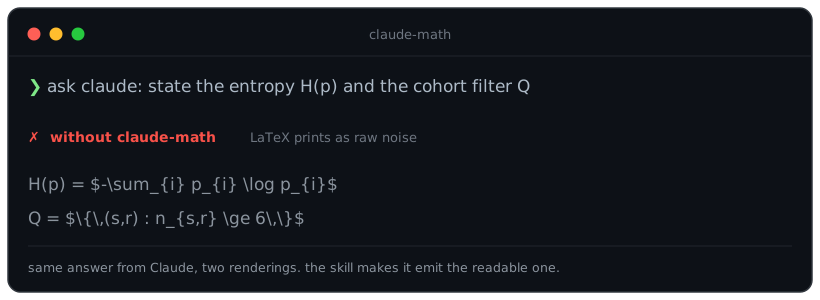
Before / after
without:  The cohort is $Q = \{ (s,r) \in T : n_{s,r} \geq 18 \}$, with $|Q|/|T| \approx 17.3\%$.
with:     The cohort is Q = { (s,r) ∈ T : n_{s,r} ≥ 18 }, with |Q| / |T| ≈ 17.3 %.
The problem
Terminal coding agents do not render LaTeX. Ask for a derivation and you get $\sum_{i=1}^{n} x_i$ printed literally, which is harder to read than plain text. This is a known, still-open gap in both harnesses (see claude-code#44479 and codex#18906). Unicode glyphs survive SSH, tmux, CI logs, copy-paste, and search, so they are the reliable way to show math where a graphics protocol cannot reach. How much a given terminal draws depends on its font: the operators, Greek letters and digit scripts render in every monospace font measured, while the letter sub- and superscripts render in a smaller set. The skill ships the measured numbers in its Font coverage table.
Install
Through the plugin marketplace (recommended):
/plugin marketplace add vladimirrott/claude-math
/plugin install claude-math@vladimirrott
Through npm (installs the skill into your Claude Code config):
npx claude-math install
Then restart Claude Code so the skill loads.
Into Codex CLI as a native plugin (recommended; no npm):
codex plugin marketplace add vladimirrott/claude-math
codex plugin add claude-math@vladimirrott
Or via npm, which drops just the skill into ~/.agents/skills/ (the current Codex user-skills directory):
claude-math install --codex
Codex auto-detects the skill; invoke it with /skills or $math-unicode. Use one path, not both.
How it works
The plugin is a single skill file plus a small installer CLI:
math-unicodeskill: a prompt that activates automatically whenever math is involved. It carries a LaTeX-to-Unicode cheatsheet and eleven style rules covering subscripts, superscripts, big operators, fractions, matrices, set-builder notation, and number formatting.- installer CLI (
claude-math): registers the plugin into~/.claude, with atomic writes, one-time backups, and symlink, junction, or copy modes. Verbs:install,uninstall,status,help.
What it does and does not do
- It does make Claude write math as Unicode inline, which renders in the chat today.
- It does not render equations as images inside the Claude Code chat. A plugin cannot: the terminal UI repaints its own screen buffer and overwrites any injected graphics sequences. Graphics belongs in the host, and that work is underway upstream (openai/codex#18906); this skill is the stopgap until it lands where you work.
Design note: copy-safe glyphs
The skill uses real math symbols and genuine sub/superscript glyphs. It deliberately avoids using the Unicode “Mathematical Alphanumeric Symbols” block (styled bold or italic letters like 𝐀 or 𝑉𝑎𝑟) to style ordinary letters, because those codepoints garble on copy, search, and screen readers. The standard blackboard-bold sets (ℕ, ℤ, ℚ, ℝ, ℂ, 𝔽) and the expectation operator (𝔼) are correct notation and are kept.
Links
- Repository: github.com/vladimirrott/claude-math
- Report an issue: github.com/vladimirrott/claude-math/issues
- License: MIT